Vectors and bitmaps are two different ways of storing and displaying images.
Images are typically saved in one of two formats: vector or bitmap. Understanding the difference is essential to creating high-quality, professional visuals.
Vector: sharp at any size
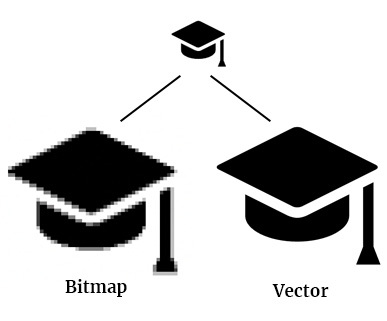
A vector image is not made of pixels, but of mathematical equations that define lines and shapes. Think of it as a recipe for a drawing.
The main advantage is that you can scale a vector image infinitely without any loss of quality. The mathematical equation is simply recalculated for the new size, ensuring the image always remains perfectly sharp. This makes vectors ideal for elements that need to be used in various sizes.
When to use a vector
- Logos and icons: The university logo must be as sharp on a business card as it is on a large banner.
- Illustrations and infographics: For drawings with clean lines and distinct shapes.
- Printed materials: For posters, flyers, and brochures where high resolution is a must.
Common vector formats: .ai, .eps, .svg
Bitmap: for detail and photography
A bitmap image, also known as a raster image, consists of a fixed grid of coloured dots called pixels. A photograph is the perfect example of this.
The number of pixels is fixed. If you enlarge the image, these pixels will be stretched to fill the new space. This causes the image to lose sharpness and become pixelated or blurry. Bitmaps are therefore resolution-dependent and less flexible in size.
When to use a bitmap?
- Photos: For capturing complex details and subtle colour gradients.
- Detailed web images: Such as atmospheric images on a website.
- Digital paintings and textures.
Common bitmap formats: .jpg, .png, .gif, .tif
Vector vs. bitmap at a glance
| Vector | Bitmap (Raster) | |
| Composition | Mathematical formulas (lines, shapes) | Grid of pixels (dots) |
| Scalability | Infinitely scalable without quality loss | Loses quality when enlarged |
| Ideal for | Logos, icons, illustrations, print | Photos, detailed web images |
| File size | Usually smaller | Often larger, depending on resolution |
| File formats | .ai, .eps, .svg | .jpg, .png, .gif, .tif |
Making the right choice
The choice between vector and bitmap depends entirely on the application. Use the following rule of thumb:
- Logos, icons and illustrations? Use a vector. This ensures the quality is always perfect, regardless of the size.
- Photographs? Use a bitmap. However, make sure the resolution is high enough for its intended use (e.g., 300 DPI for print, 72 DPI for web).
By choosing the correct file type, you ensure that the university's visual communication always looks professional and sharp.